GovChat SASSA Application Form for SRD

With the improving technology, we are getting more easy ways to do difficult tasks. And SASSA SRD application is no exception. If you are thinking of visiting the SASSA office because you want to apply for the SRD R350 grant then you are in luck. SASSA has announced that applicants can submit their Social Relief of Distress grants through the GovChat application.
Also, if you are a SASSA Disability grant applicant and you need to get an appointment for a medical assessment then you need to visit the SASSA office and stand there for hours. Because this assessment is necessary as it will prove your temporary and permanent disability.
But do you know that now you can also use GovChat to get medical assessment appointments even without visiting the SASSA office? Yes, this app has made our lives so easy.
Let’s get straight and check how you can do all these tasks.
What is a GovChat?
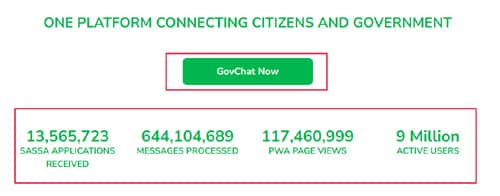
GovChat is a South African-based communication platform and mobile app. It allows citizens to engage with government services and officials. Users can use this app to submit the SASSA applications. There are over 13 million SASSA applications that GovChat has been processed so far.
It was developed with the aim of improving communication between government agencies and the public.
GovChat provides a range of features, including the ability to report issues, access government information and services, and engage in two-way communication with government representatives.
Some key features of GovChat include:
- Reporting Issues: Citizens can use the platform to report problems or issues in their communities, such as potholes, service delivery complaints, or infrastructure problems. These reports are then forwarded to the relevant government departments for action.
- Access to Government Services: GovChat provides access to a variety of government services and information, including health services, education resources, and information on government programs.
- Two-Way Communication: The platform enables citizens to engage in direct communication with government officials, providing a channel for feedback, questions, and information sharing.
- Notifications: GovChat can send notifications and updates to users about important government-related matters or events.
GovChat SASSA Application Form for SRD Grant
Applying for the SRD grant or other SASSA grants has never been easier before. The GovChat is a life savior when it comes to applying for the SRD R350 grant even without leaving your couch. In this guide, we will let you through all the easy steps that you need to apply for the grant using the GovChat app.
- Open your web surfing browser like Mozilla Firefox or Chrome.
- Type “https://govchat.app/login” and hit enter.
- Now you will see a green-themed website where you need to choose between allowing cookies or not.
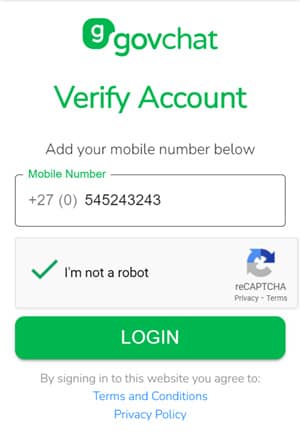
- After that, you will see a box with the text “Verify Account”.
- Here you need to enter your South African phone number.
- After that, solve the captcha.
- Now you will see the login button so click on it.
- Once you log into your account, you need to find “SASSA Services”.
- Now click on “Apply for a Grant”.
- Next, you need to choose the name of the grant that you need to apply for. In this case, you need to choose the Social Relief of Distress (SRD) grant.
- Now choose “Create New Form”.
- Now fill out the registration form with all the required details such as your first name, surname, date of birth, ID number, and phone number.
- Submit the application form and you will get a SASSA reference number that you need to keep safe.
So this is how you can use GovChat to apply for an SRD grant online with just easy peasy steps.
How to Check Sassa Status With the GovChat App?
Download and Install GovChat App:
- Visit the official app store on your mobile device (Google Play Store for Android or Apple App Store for iOS).
- Search for “GovChat” in the search bar.
- Download and install the GovChat app on your device.
Open GovChat App:
- Once the app is installed, open it by tapping on the GovChat icon.
Create an Account/Login:
- If you don’t have an account, you may need to create one using your email address or phone number. Follow the on-screen instructions to set up your account.
- If you already have an account, log in using your credentials.
Navigate to the SASSA Service:
- Inside the GovChat app, navigate to the section related to SASSA or social services. The app has a specific category or service for social grants or SASSA-related queries.
Check SASSA Status:
- Look for an option that allows you to check SASSA status. This may involve entering your ID number and phone number.
- Follow the prompts and provide the necessary information to retrieve your SASSA status.
GovChat SASSA Disability Grant Application
- Download the GovChat app on your phone from the GovChat app website.
- Register on the app by entering your phone number.
- Select the ‘Apply for Disability Grant’ option under the SASSA Services.
- Answer the questions prompted regarding your personal details, disability status, and financial situation.
- Upload scanned or photographed copies of your ID, proof of disability, and doctor’s assessment report as prompted.
- Accept the terms and conditions.
- You will receive an application reference number – save this to track progress.
- Attend the scheduled medical assessment appointment when notified via SMS.
If approved, you will be notified via the app to collect your SRD debit card from your nearest SASSA office.
Activate the SRD card and select your preferred payment method to start receiving your monthly disability grant.
Use GovChat SASSA for Medical Assessment Appointment
It is good news for the applicants of the Disability grant as they can not get medical assessment appointments via the GovChat app.
Here is what you need to do:
- Go to the ‘My Applications’ section.
- Select your disability grant application in progress.
- Click on ‘Medical Assessment’ to view appointment details.
- The app will display the date, time, and address of the assessment center.
- You can also find directions to the assessment location within GovChat.
- If you cannot attend the appointment date, use the in-app support options to reschedule the assessment appointment.
- On the day, carry your ID and medical documents to the assessment.
- The doctor will complete the medical report to confirm disability.
F.A.Q
How do I apply for the SASSA SRD grant on GovChat?
To apply for the SASSA SRD grant on GovChat, you need to visit the official GovChat website and then enter your phone number to login. Now fill out the SRD grant application form with valid details and submit the form.
What is the GovChat WhatsApp number?
GovChat has no WhatsApp number. However, you can contact them via their helpline which is “0820468553”.
Can I apply for the SASSA online application form?
Yes, you can apply for the SASSA online using the GovChat application.
How to do SASSA GovChat login?
To do the SASSA GovChat login, you need to enter your phone number and that’s it.
How to apply for a R700 grant?
There is no R700 grant that you can apply for. It is fake news.
How to apply for the new R999 grant?
You can not apply for an R999 grant as SASSA has officially said that there is no such type of grant.
How do I appeal my SASSA SRD R350 grant?
You need to visit the SASSA office to appeal for your R350 SRD grant.
GovChat Contact Details
If you have questions or problems related to GovChat and want to submit your queries then you can use the following GovChat contact details.
- Office Address: 1st floor, 37 Parliament St, Cape Town City Centre, Cape Town, 8000
- Helpline: 082 046 8553